

Most small companies we talk to have the same shape: a website, a server or two, a handful of cloud accounts, and nobody whose job title is security. In our experience the missing piece is rarely knowledge; it is order. Teams know they should patch, back up, and protect their logins, but struggle to say which buys the most safety for a day of work. This small business security checklist ranks eight long-standing basics so a small team can work through them in about a week, with the reasoning for each placement and a summary table at the end.
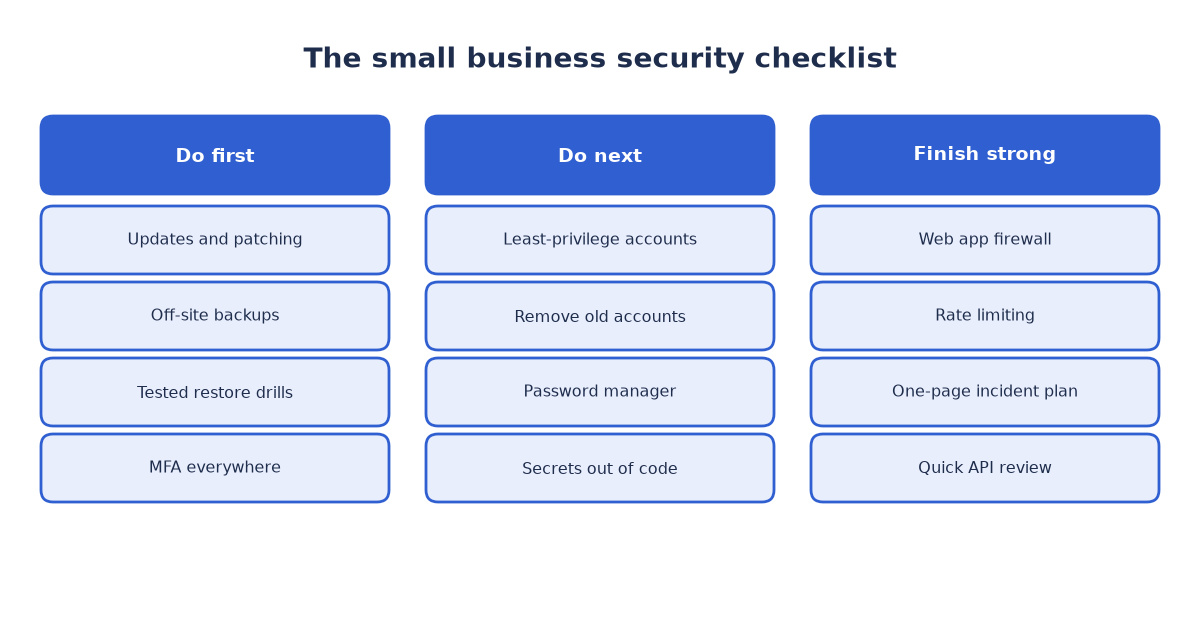
Figure 1: The eight items in order, fastest wins first
Why this small business security checklist is ranked this way
The ordering rule is simple: stop the most likely attacks first, for the least effort. Opportunistic attackers scan the internet for flaws that already have a fix and for login pages that accept guessed or reused passwords; they almost never start with a custom exploit. Public guidance for smaller organizations, such as the small business guide from the UK National Cyber Security Centre and the CISA Secure Our World campaign, converges on the same handful of basics, and our experience matches it: patch, back up, protect identities, limit access, and prepare a response.
Each item leans on the one before it: backups matter more once patching lowers the odds of needing them, access limits pay off once logins are hard to break, and the incident plan is worth little until restores are tested. Done in order, every step makes the next one cheaper.
Do first: patching, backups, and login protection
1. Updates and patching
Why this one first: it is the lowest-effort, highest-coverage item on the list. Most successful attacks exploit flaws for which a fix already exists, because unpatched software is easy to find automatically. Turn on automatic updates for the operating system, the website platform and its extensions, application dependencies, and firmware. For anything that cannot self-update, set a recurring monthly slot and treat it like a meeting that cannot move. Retire software that has stopped receiving fixes; unsupported components cannot be patched at all.
2. Off-site backups with a tested restore
Why second: patching lowers the chance of an incident; backups cap the damage when one happens anyway. Two rules make them real: keep the copy off-site, on separate infrastructure with separate credentials, because a backup on the same server dies with it. And practice the restore, since an untested backup is a hope, not a plan. Our guide to testing backup restores covers scheduling drills, verifying files, and measuring how long a restore takes. Ransomware operators look for backups early, so keep a copy that routine accounts cannot modify or delete.
3. Multi-factor authentication everywhere
Why third: passwords leak constantly, through reuse, phishing, and breaches of other services, and no policy stops people from choosing weak ones. Multi-factor authentication turns a stolen password into an incomplete login. Switch it on for email first, because a captured mailbox can reset everything else, then for admin panels, cloud consoles, banking, and chat. Prefer authenticator apps or hardware keys over text messages where a service offers a choice. Enroll administrators and finance staff first, since those accounts carry the most damage.
Do next: accounts, passwords, and secrets
4. Least-privilege accounts, and removing old ones
Why here: once logins are hard to break, shrink what a broken login can reach. Give every person the smallest role that does their job, keep administrator rights to the few who need them, and separate admin accounts from daily ones. Review access quarterly, and remove accounts the day someone leaves, along with shared or forgotten logins nobody owns. The same discipline applies to business systems such as ERP or CRM platforms; our decision guide for packaged versus custom business systems treats access control as a selection criterion, not an afterthought.
5. A password manager for the whole team
Why here: it makes items three and four practical. A password manager generates long unique passwords, stores them safely, and shares them without anyone typing them into chat. It removes the shared spreadsheet, and when someone leaves, access is revoked in one place instead of hunted through dozens of services. Choose one with a company vault, so credentials stay with the organization rather than a personal account.
6. Secrets out of code and chat
Why here: keys, tokens, and database passwords leak quietly, long before anyone notices. Keep them in environment variables or a dedicated secrets store, never committed to a code repository and never pasted into chat, tickets, or screenshots. Treat any secret that reached the wrong place as compromised and rotate it. A short search through repositories and chat history usually turns up something worth rotating.
Do this week too: a firewall and rate limiting for the public door
Why here: with identities and data protected, the remaining exposure is the public-facing application. A basic web application firewall filters common attack traffic before it reaches the site, and rate limiting blunts brute-force logins, credential stuffing, and aggressive scraping. On most hosting platforms both are a configuration exercise rather than a purchase, measured in hours. The patterns they filter map closely to the OWASP Top Ten, which works well as a review of what the firewall should be catching.
If the company exposes an API, give it a short review too: broken access control and excessive data exposure are common weaknesses, and the OWASP API Security project is a practical starting point.
Finish with a one-page incident plan
Why last, and why at all: the first seven items lower the odds of an incident, and this one lowers its cost. One page is enough: what counts as an incident, who decides what to do, and how to reach each other outside working hours. List the first technical steps: isolate the affected machine, change credentials from a clean device, and preserve evidence rather than wiping it. Note who must be told, including customers, insurers, and any regulator that applies, and attach the restore procedure from item two. Store the page where it survives the incident, including on paper, and walk through it once or twice a year: teams that rehearse decide faster, and speed is most of the outcome.
The small business security checklist at a glance
Keep the small business security checklist visible: print it, pin it, or turn it into tickets. The table summarizes the order, the effort, and the payoff.
| Item | Effort | What it prevents |
|---|---|---|
| Updates and patching | Low, recurring | Break-ins through known flaws |
| Off-site backups, restore tested | Medium, then drills | Ransomware and data loss |
| Multi-factor authentication | Low | Stolen-password logins |
| Least privilege and cleanup | Medium | Misuse and lateral spread |
| Password manager | Low | Weak and reused passwords |
| Secrets out of code and chat | Medium | Leaked keys and tokens |
| Firewall and rate limiting | Low to medium | Bots, stuffing, scraping |
| One-page incident plan | Low | Slow and chaotic response |
A small business security checklist works only if it gets done, and that is the point of ranking one: eight ordinary items, each making the next cheaper, add up to a week of focused work and a company that is a poor target. If you would like a second pair of eyes before you start, we offer a free 30-minute review of your setup and priorities. Write to info (at) abcsoft (dot) digital or use the contact form, and we will walk through the order with you.
Add a Comment