

Self hosting vs saas is one of the most common tooling decisions a small company faces. A software as a service subscription hands the running of a product to a vendor, while self-hosting) puts that work, and that responsibility, on your own team. Both are respectable answers, and an honest self hosting vs saas comparison is rarely about ideology. It is about who does the work, who carries the risk and what everything really costs. This post gives you a ten-question scorecard to run before you replace any SaaS tool with a self-hosted alternative.
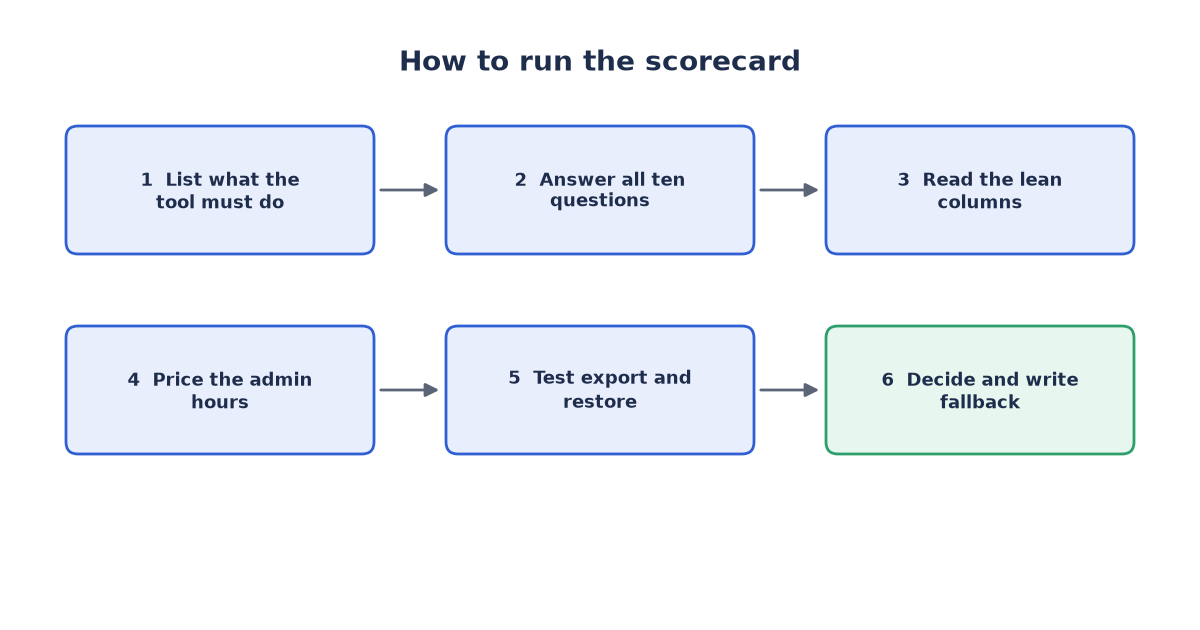
Figure 1: the scorecard flow
Self hosting vs saas: the short version
Start with the uncomfortable fact: self-hosting is often described as free, and often is not. The licence fee may be zero, but the software still needs an administrator, a patching routine, backups, monitoring and an occasional restore test, done by people you pay. In our experience the balance between buying and hosting flips once you price in those hours. For a small team with no spare capacity, a subscription is frequently the cheaper option; for a team with the skills and the time to spare, self-hosting can win on cost, control and data locality. Neither answer is universal, which is why a scorecard beats a slogan.
The self hosting vs saas scorecard in ten questions
Run every candidate tool through the same ten questions, in the same order, and apply the same reading rule every time one of these questions comes up. If the left column below describes your situation, lean SaaS. If the right column does, lean self-host.
| Question | Lean SaaS if | Lean self-host if |
|---|---|---|
| 1. Who administers it? | No spare admin capacity | Someone can own it fully |
| 2. Who applies updates? | You want patches handled | You need change control |
| 3. Backups and restores? | Vendor backup is trusted | You will test restores |
| 4. Security liability? | Shared duty is acceptable | You must own the risk |
| 5. Uptime expectations? | Office hours are enough | The tool must always run |
| 6. Integrations? | It fits your stack as is | You can build custom glue |
| 7. Data export and exit? | Export paths are easy | Data must stay local |
| 8. True total cost? | Fee beats admin hours | Admin hours beat fee |
| 9. Licence terms? | Standard terms are fine | Licence fits your use |
| 10. Fallback plan? | Vendor support is enough | You can revert fast |
Count the leans honestly. If the answers split evenly, treat that as a real result: the safer default is to stay with the subscription and revisit later, because switching is itself a project. When in doubt, weigh the cost question hardest, because the true the comparison gap is measured in hours, not in fees.
Who administers it, and who patches it
Questions one and two decide most switches before they start. Every self-hosted tool needs a named owner: someone who installs it, watches it, applies updates and answers when it misbehaves. If that person leaves, the duty has to travel with the role. Self-hosting suits teams that already have this capacity and punishes teams where the plan is that someone will look after it, which usually means no one. A vendor folds the same work into the subscription, and that is where much of the real difference between the two options lives. Patching follows the same logic. An unpatched service exposed to the internet is an open invitation, so postponing updates until convenient is not a plan. With a vendor, security fixes arrive on their schedule; with self-hosting they arrive on yours, and yours has to include urgent ones.
Backups, uptime and security liability
A backup you have never restored is a hope, not a plan. Ask what the backup contains, where a second copy lives, how often it runs and who last proved that a restore works. The same discipline applies whatever the tool; we described it for one common case in testing WordPress backup restores on a staging server, and the pattern generalises. Uptime comes next. A vendor spreads failures and on-call duty across many customers and staff, while a small team that self-hosts a critical tool carries every outage alone. Security liability follows the same line. With a hosted product, part of the duty sits with the vendor; once you host the software, the data, the access controls and the consequences of a breach are yours. In this scorecard, these three questions move the needle more than price does.
Integrations, data export and exit cost
Tools rarely live alone. Check that a self-hosted alternative connects to the rest of your stack: sign-on, file storage, notifications and every place data has to flow. Each missing integration becomes custom work you own forever, and glue code is the quiet tax of self-hosting. Then plan the exit before you enter. Ask how you would get your data out, in what format, and whether anything else can read it afterwards. Weak export paths create vendor lock-in, and lock-in works in both directions: an opaque self-hosted data format can trap a team as firmly as a subscription with no export button. A strong answer to this question is a documented export that a second person can run unaided.
True cost, licences and the fallback plan
Compare like with like. The subscription side is easy: a predictable fee per period. The self-hosted side needs total cost of ownership thinking: infrastructure, storage, monitoring, admin hours, patch windows, restore tests and the occasional rescue. If hosting means choosing a cloud provider, that choice is itself work; our plain-language guide to picking between the major clouds for an MVP shows how much comparison even a first project involves. Put a realistic value on the admin hours and total it over the same period as the subscription fee. That is where free software stops being free and where, in our experience, most the comparison decisions are actually decided.
Read the licence too. Some open-source licences are permissive, while others restrict commercial use, redistribution or offering the software as a hosted service, and those restrictions can matter long after adoption. Finally, write the fallback plan before the switch, not during the first outage. If the self-hosted tool fails or its owner leaves, who moves the team back to something else, how fast, and with what data? If the honest answer is that you would be stuck for weeks with no export, that is your scorecard talking. Listen to it.
Self hosting vs saas: decide with the scorecard, not with fashion
The tooling debate swings between subscriptions and self-hosting from time to time, and both swings produce avoidable mess when teams follow the mood instead of their constraints. A scorecard keeps the decision boring, which is exactly what you want from the systems your work depends on. Run the ten questions, weigh the answers against your real capacity, and revisit the result whenever the team or the workload changes. If you would like a second opinion on the self hosting vs saas choice for your own tools, we offer a free 30-minute review: tell us what you are considering and what your team can realistically administer, and we will walk through the scorecard with you. Reach us through the contact page or write to info (at) abcsoft (dot) digital.
Add a Comment