

Last updated: October 2026.
Every founder asks the same thing: which cloud should we build on? The honest answer to the AWS vs GCP vs OCI question is that for most MVPs, any of the big three will work. The decision matters less than people think at the start and more than they think two years later.
This AWS vs GCP vs OCI guide compares Amazon Web Services (AWS), Google Cloud (GCP) and Oracle Cloud Infrastructure (OCI) in plain language. It mixes verified facts with clearly marked opinion. Prices and offers change often, so everything dated here was read from official pages in October 2026. Check again before you commit.
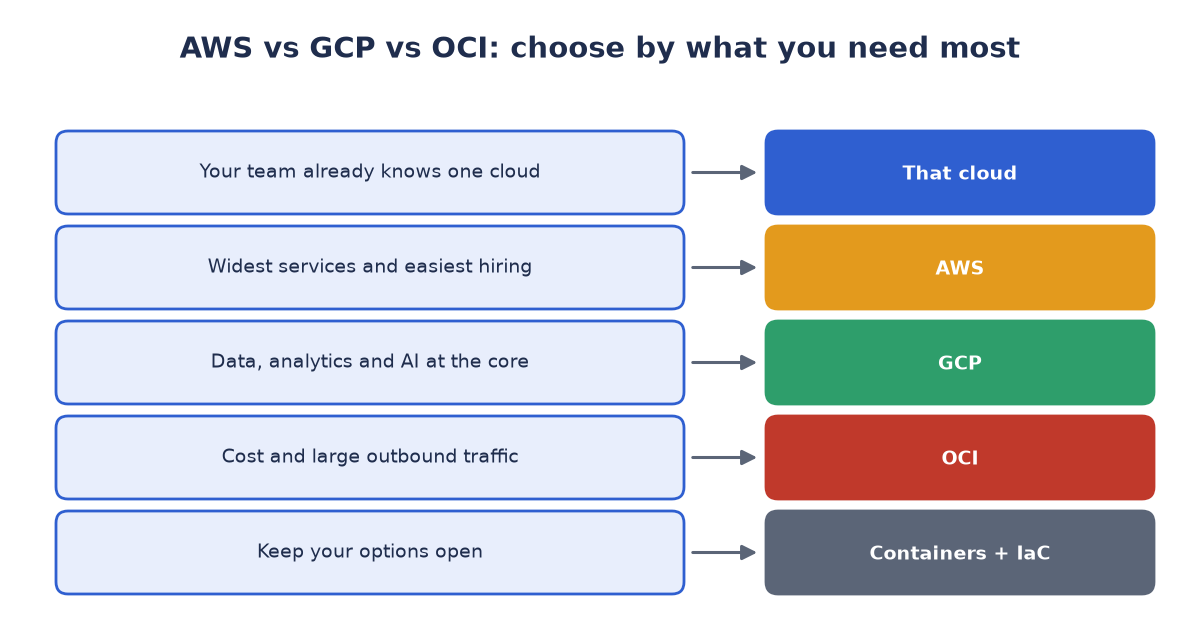
Figure 1: AWS vs GCP vs OCI, matched to your main need.
AWS vs GCP vs OCI: start with needs, not with the logo
Before comparing clouds, write down:
- What are we building (web app, API, data pipeline, AI feature)?
- How much traffic and data do we expect in the first year?
- Who on the team already knows a cloud?
- Do we need a specific region or compliance regime?
- What is our monthly budget ceiling?
If one answer is “our team already knows X”, that usually settles it.
Free offers and trials (as of October 2026)
- AWS: new accounts get a free plan with up to 200 USD in credits (100 USD at sign-up and up to 100 USD more for completing onboarding tasks). It ends after six months or when the credits run out, whichever is first. Services such as EC2, RDS and S3 are covered by those credits rather than being free forever for new accounts. There is also a list of always-free services with monthly limits.
- Google Cloud: an Always Free tier includes, among other things, one e2-micro VM per month in selected US regions and 30 GB-months of standard disk. It is small, but it is not time-limited.
- OCI: an Always Free tier includes small AMD VMs, an Arm (Ampere A1) compute allowance, 200 GB of block storage and 10 TB of outbound data per month, plus a 30-day trial credit for the wider service catalog. Allowances for Always Free-only accounts and paid accounts differ, so read Oracle’s documentation for your account type.
A free offer is a way to learn, not a reason to choose. Credits expire; architecture decisions last.
What does it cost? Three sample data points
These are samples, not a like-for-like comparison.
- AWS Lightsail: the Lightsail pricing page uses a 5 USD per month bundle with 1 GB of memory in its WordPress example. Extra data transfer in its example is 0.09 USD per GB.
- OCI Arm compute: Oracle’s published rate was 0.01 USD per OCPU-hour plus 0.0015 USD per GB-hour. A small server with 2 OCPUs and 12 GB of memory running a full month (730 hours) works out to about 27.74 USD before any free allowance.
- Egress (data leaving the cloud): AWS gives 100 GB per month free and bills roughly 0.09 USD per GB beyond that, according to AWS’s own material. OCI includes 10 TB of outbound data per month. For GCP, use the pricing calculator for your regions.
Egress is the line item that surprises people. If your product serves a lot of video, images or downloads, model it early.
AWS vs GCP vs OCI strengths, in plain language (our opinion)
AWS has the broadest catalog, the largest community, the most documentation and the easiest hiring. The trade-off is complexity and the risk of billing surprises. It rewards teams that learn its cost tools early.
Google Cloud is often loved for data, analytics, AI tooling and Kubernetes heritage, and for relatively clean networking and projects. Its serverless container platform, Cloud Run, is a favorite for small teams. Your team may find the service catalog smaller than AWS’s.
OCI is attractive when price and egress matter, when you run virtual-machine-heavy workloads, or when you rely on Oracle databases. Its service catalog and community are smaller than the other two, so expect to do more of your own research.
An AWS vs GCP vs OCI decision shortcut
| If your situation is… | Lean toward… |
|---|---|
| Your team already knows one cloud | That cloud |
| Simple web app, tiny team, predictable cost | A simple managed offer such as Lightsail or Cloud Run |
| You need the widest choice of managed services and hiring pool | AWS |
| Data, analytics or AI is the heart of the product | GCP (and compare AWS) |
| Cost and large outbound traffic dominate | OCI (and compare the others) |
| You must keep your options open | Containers, standard databases and infrastructure as code on any of them |
A multi-cloud-friendly way to build
You do not need to run on three clouds. You do need to be able to leave one. The habits that keep you free:
- Package in containers and keep your deployment definition in code (Terraform or OpenTofu work across all three).
- Prefer standard, portable services: PostgreSQL or MySQL, Redis, S3-compatible object storage, standard message queues.
- Isolate provider-specific services behind your own interfaces, so a swap is a bounded project.
- Keep backups in a different provider from production. It protects you from account problems as well as outages.
- Choose per workload. A static site, an AI batch job and a transactional database may belong in different places.
Be honest about the price of portability: it costs some convenience. Use portable building blocks for the core and accept managed, provider-specific services where the time saved is large and the exit cost is acceptable.
AI-heavy MVPs
If your product needs GPUs, check availability and quotas in your target region before you plan around them. All three providers offer GPU instances, but access, quotas and prices vary by region and change quickly. If inference cost is your biggest risk, also compare hosted AI APIs against running open models yourself.
Controlling cost from day one
- Set a budget and alerts on day one.
- Tag everything so you can see who spent what.
- Shut down development environments outside working hours.
- Watch egress and storage growth monthly.
- Review credits’ expiry dates and plan the move to paid usage.
Our summary
In the AWS vs GCP vs OCI decision for an MVP, pick the cloud your team can move fastest on, build with portable parts, watch egress, and revisit the decision once you have real traffic and real bills. The best cloud is the one you can leave if you must.
Picking a cloud for your MVP?
The right choice depends on your team, workload and budget. Book a free 30-minute Cloud Choice Review through our contact page and we’ll compare options for your workload and budget. You can also email us at info (at) abcsoft (dot) digital.
Add a Comment