

Learning programming in the AI era feels unlike anything earlier beginners experienced. On day one you can ask an AI coding assistant for a working snippet, paste it, run it, and watch something real happen. That is motivating, and it is also a trap: working code is not the same as understanding, and the easiest way to stall is to feel competent before you are. In this post we use a classic model of skill building as a map: where AI assistants genuinely help at each stage, where they quietly hurt, and what to practice to move on.
This post is the refreshed successor of our 2020 piece Are you willing to learn to program?, the older version of this argument, written before coding assistants were common. The question back then was whether you were willing to learn at all. The question now is whether you can keep learning honestly while a machine offers to do the work for you.
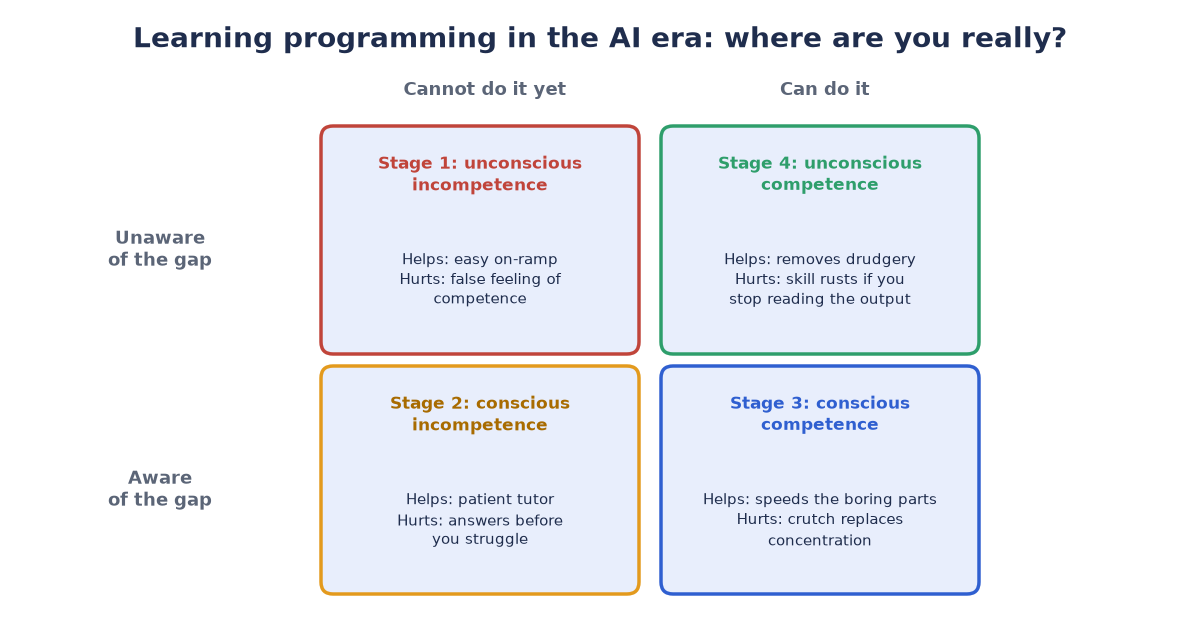
Figure 1: Awareness by skill, and the double role of AI in every cell.
Why Learning Programming in the AI Era Feels Different
The backbone is the four stages of competence, a model described by Noel Burch at Gordon Training International in the 1970s. Every new skill passes through four states: you do not know what you cannot do (unconscious incompetence), you see the gap (conscious incompetence), you can do it with effort (conscious competence), and you can do it without thinking (unconscious competence). The same arc appears in the Dreyfus model of skill acquisition, which traces novices becoming experts through experience rather than instruction alone.
Before coding assistants, the distance between “code that runs” and “code I understand” was small. If your program worked, you had usually written it, and writing it had taught you something. Now the distance is wide. A beginner can produce output that looks like stage three work while understanding almost none of it. That is fine for a throwaway script. It is dangerous for a career, because the fundamentals you skip come back later as bugs you cannot diagnose, code reviews you cannot answer, and interviews you cannot pass.
The four stages still apply. What changed is how easily you can fool yourself about which one you are in.
Where You Stand: Learning Programming in the AI Era as a 2×2 Matrix
Like an Eisenhower matrix, we lay the stages on two axes: awareness (do you know what the skill requires?) and skill (can you do it?). Each cell is one stage, and in every cell AI coding assistants play a double role: tutor and tempter at once.
| Awareness x Skill | Cannot do it yet (low skill) | Can do it (high skill) |
|---|---|---|
| Unaware of the gap (low awareness) | Stage 1: unconscious incompetence. AI helps: a gentle on-ramp – instant answers, working examples, less fear of the blank editor. AI hurts: the illusion of competence. Pasted code that runs makes a beginner feel finished, so the gap is never discovered. | Stage 4: unconscious competence. AI helps: it removes drudgery – boilerplate, refactoring, searching – so attention goes to design and judgment. AI hurts: skill rusts when an expert stops reading what the tool writes and rubber-stamps output they would once have caught. |
| Aware of the gap (high awareness) | Stage 2: conscious incompetence. AI helps: a patient tutor that explains errors and breaks work into smaller steps. AI hurts: it answers before you struggle, so you never build your own map of the gap and skip the productive frustration that signals growth. | Stage 3: conscious competence. AI helps: it speeds the boring parts, suggests tests, reviews your code, and explains problems you missed. AI hurts: the crutch replaces the concentration that builds fluency, and you stay slow and dependent instead of becoming automatic. |
The cell to watch is the top left. Unconscious incompetence used to feel like confusion: nothing worked and you knew it. Now it can feel like success. The code runs, the small win arrives, and the learner never gets the signal that anything is left to learn. This is why two people can spend the same year with an assistant and end up in very different places: one used it as a tutor, the other as a ghostwriter.
How to Tell Which Cell You Are Really In
Output is no longer evidence of skill, so test yourself differently. Honest questions:
- Can you explain your own code line by line without running it?
- Can you predict what will break if you change one input or remove one line?
- Can you debug a small failure without pasting the error into an assistant?
- Can you write a tiny program of your own design, from an empty file?
If most answers are “not yet”, you are in the left column, no matter how well your projects run. That is not a verdict. It is a direction.
What to Practice at Each Stage
- From unconscious to conscious incompetence: write small things yourself first, badly, then ask the assistant for its version and compare the two. Read more code than you copy, and keep a list of every term or line you cannot explain. That list is your curriculum.
- From conscious incompetence to conscious competence: struggle before you ask. Try, fail, form a guess, test it, and only then ask for an explanation. Retype useful code instead of pasting it, because typing forces you to notice what you skipped.
- From conscious competence to unconscious competence: repeat with variety. Build similar small projects in new contexts, review other people’s code, teach a junior, and occasionally rebuild something with the assistant switched off to check the fluency is really yours.
For Managers: Training Juniors Who Learn With AI
Managers see the same illusion from the other side. Juniors now ship working code sooner, which makes them look further along than they are. Habits that help:
- Ask juniors to walk through AI-generated code line by line in code review. “Why does this work?” beats “does this work?”
- Pair on debugging with the assistant closed for the first stretch of a session. For distributed teams, our Remote Teams Tools 2027 guide covers open-source-first setups for pairing and reviews.
- Make “I do not know yet” a safe answer. People only leave the top-left cell if admitting they are in it carries no penalty.
- Do not ban the tools. Ban unexplained code. An assistant is a fine tutor and a poor ghostwriter; the difference is whether the junior can account for every line.
- When an assistant should read internal systems, give it scoped, auditable access. Our MCP for business teams guide explains that pattern.
Find Your Cell
Learning programming in the AI era still means walking through the same four stages: the tools changed, the map did not. Find your cell honestly, practice what that cell asks for, and treat every AI-generated line as something you must be able to explain. Our 2020 post asked whether you were willing to learn to program; the answer now also depends on whether you are willing to understand what you ship. If your team is deciding how to train developers while assistants do more of the typing, we offer a free 30-minute review – book a slot here or write to info (at) abcsoft (dot) digital.
Add a Comment