

Last updated: October 2026.
Our earlier list of remote teams tools covered around thirty tools in fifteen categories. This 2027 edition of the remote teams tools list covers fifteen categories again, adds an open-source option for each, and drops three niche ones from the old list (virtual team games, contracts and escrow, document workflow). It leans on open-source software wherever it is good enough, and it tells you where we would still use a proprietary tool.
We will not walk through exactly how we run our own setup. The point is to help you build yours.
Categories are loosely defined, so one tool can belong to more than one. None of the links in this post are affiliate links. Like the old list, this one is a living document: expect changes.
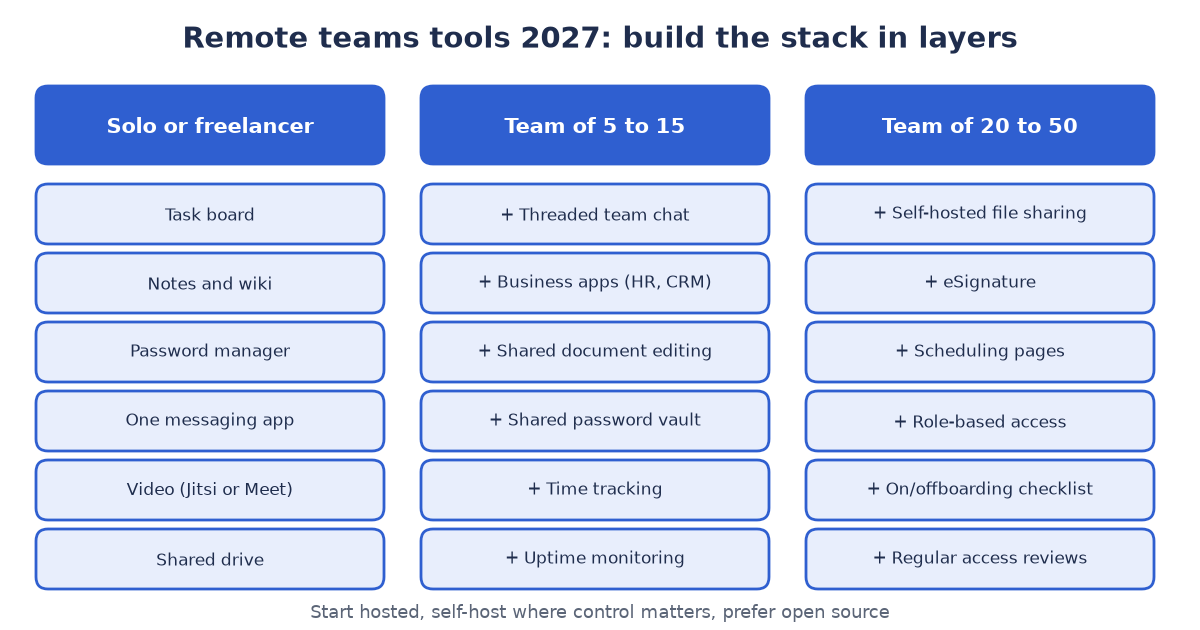
Figure 1: remote teams tools stacked by team size.
Why open source first for remote teams tools?
- You own your data. You can export it, move it and back it up on your terms.
- Less lock-in. If a vendor changes pricing or limits, you are not forced to move.
- Self-hosting is optional. Most of these tools also offer a hosted plan, so you can start hosted and move later.
- History that lasts. Remote work runs on written decisions. Tools that hide old messages or tasks quietly delete your team’s memory.
A note on licenses: open source is not one thing. Licenses vary (Apache-2.0, MIT, GPL, AGPL and others), and some projects are open core, meaning a free core plus paid extras. The licenses below were checked in each project’s public repository (for example Plane, Jitsi Meet and Zulip) in October 2026. Read the license before you build a business on a tool.
The remote teams tools list
| Need | Open-source pick | Proprietary alternative | Notes |
|---|---|---|---|
| Tasks and projects | Plane (AGPL-3.0) | Jira, Asana, Trello | Boards, cycles and issues you can self-host or use hosted. |
| Business apps: HR, recruitment, CRM, inventory, accounting | Odoo (Community Edition is open source; Enterprise is paid) | Many single-purpose SaaS tools | One system instead of five. Modular, so you switch on only what you need. |
| Team chat | Zulip (Apache-2.0), Element with Matrix (AGPL-3.0) | Slack, Microsoft Teams | Zulip’s topic threads suit asynchronous teams. |
| Everyday messaging | Telegram (apps are open source, servers are not), Discord (proprietary) | WhatsApp, Slack | Both keep message history searchable. Check each plan’s current limits: some free plans of other tools restrict how far back you can scroll. |
| Video meetings | Jitsi Meet (Apache-2.0) | Google Meet, Zoom | We use both Jitsi and Google Meet. Jitsi is easy to self-host; Meet is convenient inside Google accounts. |
| Files, calendar, contacts | Nextcloud (AGPL-3.0) | Google Workspace, Microsoft 365 | Self-hosted file sync and sharing. |
| Design | Penpot (MPL-2.0) | Figma | Browser-based design and prototyping. |
| Passwords | Vaultwarden (AGPL-3.0), a Bitwarden-compatible server | 1Password, LastPass | Shared team vaults. Consider the hosted Bitwarden service if you do not want to run it. |
| Uptime monitoring | Uptime Kuma (MIT) | Pingdom, StatusCake | Simple status checks and alerts. |
| Hosting control panel | Hestia (GPL-3.0) | cPanel, Plesk | Manage sites, mail and DNS on your own VPS. |
| Notes and wiki | BookStack (MIT), XWiki (LGPL-2.1) | Notion, Confluence | A shared, searchable memory for procedures and decisions. Pick one place and keep it current. |
| Document collaboration | ONLYOFFICE Docs (AGPL-3.0), Etherpad (Apache-2.0) | Google Docs, Microsoft 365 | ONLYOFFICE edits office files together and is often connected to a file-sharing tool. Etherpad is a light real-time editor for quick shared notes. |
| Time tracking | Kimai (AGPL-3.0) | Toggl, Time Doctor | Time sheets per project and customer. Agree with the team what is tracked, and why, before you start. |
| Scheduling | Cal.diy (MIT), the self-hosting edition of Cal.com | Calendly, Google Calendar | Booking pages that find a common time across time zones. |
| eSignature | Documenso (AGPL-3.0), DocuSeal (AGPL-3.0) | DocuSign, Adobe Sign | Sign contracts and forms online. Odoo also has a Sign app; check which Odoo edition includes it before you count on it. |
How to choose: seven questions
- What problem are we solving? Write it in one sentence before you pick a tool.
- Can we export everything? Test an export on day one.
- Does it keep history? Messages, tasks and files should stay searchable.
- Who owns the account? Company-owned accounts, not personal ones.
- What is the exit plan? If this tool disappeared tomorrow, what would we do?
- How much admin does it need? Self-hosting is free in license terms, not in time.
- Does it integrate? Look for an API, webhooks and, increasingly, an MCP server so that automation and AI assistants can work with it.
Communication rules matter more than tools
Before choosing apps, decide what kind of conversation each one is for. The communication pyramid has five levels, from the cheapest and most asynchronous to the richest: email (level 1), instant messaging (level 2), voice communication (level 3), video communication (level 4) and face-to-face communication (level 5).
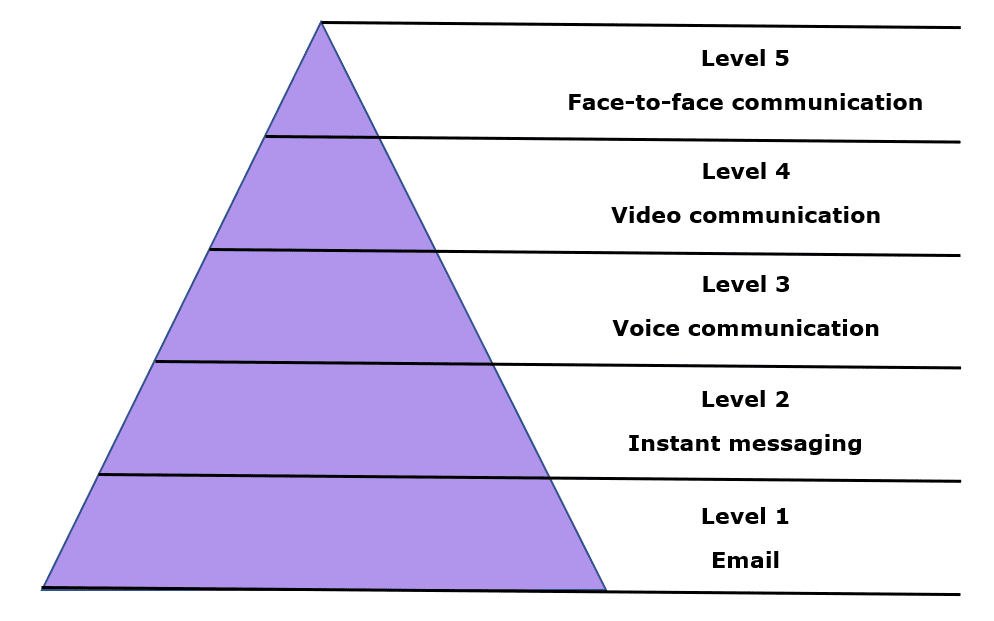
Figure 2: the communication pyramid. When working in a remote or virtual setup, spend considerable time in levels 3 to 4 when you communicate with teammates.
Written messages are easy to send and easy to keep, but they carry little tone, which is where misunderstandings start. Voice and video carry tone and expression, so our recommendation is to spend a good share of your time at levels 3 and 4. A practical habit: when a written thread passes a few replies, move up a level, then move back down and write the decision into the task or document. Most tools in the list above serve levels 1 to 4: the chat tools cover levels 1 and 2, and Jitsi or Meet cover levels 3 and 4. No tool replaces level 5, so plan an occasional in-person meetup if your team can.
Most remote-team problems are not tool problems. Four habits do more than any app:
- Write things down. Decisions go into the task or document, not only into chat.
- Default to asynchronous. Use meetings for discussion and relationship-building, not for status updates.
- One place per kind of information. Tasks in the task tool, files in the file tool, chat for conversation.
- Short, regular check-ins. A weekly review of what is done, what is blocked and what is next beats daily noise.
Three sample stacks of remote teams tools
Solo founder or freelancer. A task board (Plane or a simple list), a notes tool or wiki, a password manager, one messaging app, video via Jitsi or Meet, and a shared drive.
Team of five to fifteen. Add a chat tool with threads (Zulip or similar), a business-app suite for sales and HR (Odoo, with only the apps you need), shared document editing, a shared password vault, time tracking if you bill by the hour, and uptime monitoring for anything customers see.
Team of twenty to fifty. Add self-hosted file sharing, e-signatures and scheduling pages, role-based access in every tool, a written onboarding and offboarding checklist, and regular access reviews. This is the size where “who has access to what” starts to matter more than which brand you picked.
What we would not do
- Adopt ten tools at once. Add one, learn it, then add the next.
- Self-host everything on day one. Start hosted, self-host the tools where control matters.
- Leave accounts personal. When someone leaves, you lose the history.
ABCSoft’s summary
Pick few remote teams tools, prefer open standards and open source, keep your data portable and write things down. The best stack is the one your team actually uses.
Choosing or consolidating tools for your team?
The best stack is the one your team actually uses. Book a free 30-minute Remote Stack Review through our contact page and we’ll map your needs to an open-source-first stack. You can also email us at info (at) abcsoft (dot) digital.
Add a Comment